Chinese PDF → Word · Free · No sign-up
Convert a PDF with Chinese Characters to Editable Word
Chinese PDFs go wrong in ways an English one never does. The characters come back as empty boxes, as tofu blocks, as rows of question marks — or the page arrives as a picture you cannot type into. Upload yours and get a Word file whose Chinese you can select, search, retype and hand to a colleague.
Upload a PDF Basic mode is free and needs no account: 10 pages a day and 100 a month, rising to 100 pages a day and 1,000 a month once you sign in. Scanned pages come back as page images, with any text the PDF already carries left editable. AI mode transcribes scans into real editable text — sign in and add a payment method, or paste your own API key below. No watermark.
Converting…
Off by default. Your PDF is deleted on schedule unless you tick this; ticked, it is kept for our engineers to study this conversion. Untick any time.
Options · AI / Basic · your own key
Advanced — bring your own AI provider
Scanned pages are read by an AI vision model. Bring your own provider to convert scanned pages at your provider’s rates and the quality you choose.
Applies to your own key. Scanned pages use AI vision either way.
Used only for this one conversion. Never stored, never logged.
Last updated: 2026-09-16
Why Chinese text comes back as boxes, tofu or gibberish
Search for this problem and you land in forum threads, not on product pages: the Adobe user community, r/Acrobat on Reddit, the chinesemac mailing list, chinese-forums.com. A patent translator, a graduate student, someone digitising a family document — the same question, asked over and over for a decade, because the word "garbled" is used for three unrelated faults that happen to look the same on screen.
One: the PDF has no readable Chinese in it to begin with. Many Chinese PDFs embed only the subset of glyphs the page actually draws, and some are written without the lookup table that maps those glyphs back to Unicode. The page displays perfectly, because the shapes are there. Copy a line out of it and you get meaningless codes, because the characters are not. No converter can fix this by reading the text layer — the text layer is the problem, and the page has to be re-read as an image instead.
Two: the converter gave up on the layout. Faced with a Chinese page it cannot reconstruct — a two-column report, a form with ruled cells, a worksheet — a converter will often paste the whole page into Word as an image, or scatter the text across dozens of overlapping text boxes. Technically that is a .docx. Practically you cannot edit a word of it without the page falling apart.
Three: the characters are right and the font is missing. This is the most frustrating one, because the file is fine. A .docx does not contain the typeface, only its name, and Word resolves that name on whichever machine opens the document. If the named face is not installed there, Word substitutes — and for CJK, substituting badly means empty boxes, the "tofu" blocks the problem is named after. The file you sent is intact; the screen showing it is not.
A thirty-second diagnosis, before you convert anything: try to select one line of Chinese in the PDF and paste it into a plain text editor. Correct characters mean the text layer is sound, and any mess you get afterwards is the converter's or the font's. Nothing selectable means the page is a scan. Selectable-but-nonsense means fault one, and the page needs to be treated as a scan too.
Simplified, Traditional, and documents that mix both
Most Chinese OCR tools make you declare the script before you start: one page for Simplified, a different page for Traditional, and no obvious answer for a document containing both. That is a strange thing to ask a user, who often has the PDF precisely because they cannot read all of it yet.
Here there is no script selector. You upload the PDF; that is the entire decision. For a text-based PDF the characters come out of the file's own text layer, so whatever was written stays written — Simplified, Traditional, or a Taiwanese contract quoting a mainland standard in the middle of a clause. For a scanned page, the AI vision model reads the page as a page, the way a person would, rather than running a script-specific engine you had to pick in advance. Punctuation behaves the same way: full-width commas, 、 enumeration marks, 《》 title brackets and 「」 quotes arrive as the characters they are, not as ASCII lookalikes.
Scanned Chinese PDFs: the case everything else gives up on
A scanned Chinese document is the hard case, and it is the one this converter was built around. Not a clean export from Word — a photocopy of a worksheet, a stamped official notice, a form with ruled fill-in cells, a page someone photographed on a desk. The engine's own golden test corpus is made of exactly these: Chinese worksheets, government documents, ruled forms.
What comes back is the part worth looking at rather than describing. The page below is a scanned Chinese practice sheet with 四线三格 handwriting grids — the kind of page that normally ends up as a flat image in a Word file — rebuilt as a document with real headings, real grid rows and text you can type into.
Proof
A scanned Chinese page in. A document you can edit out.
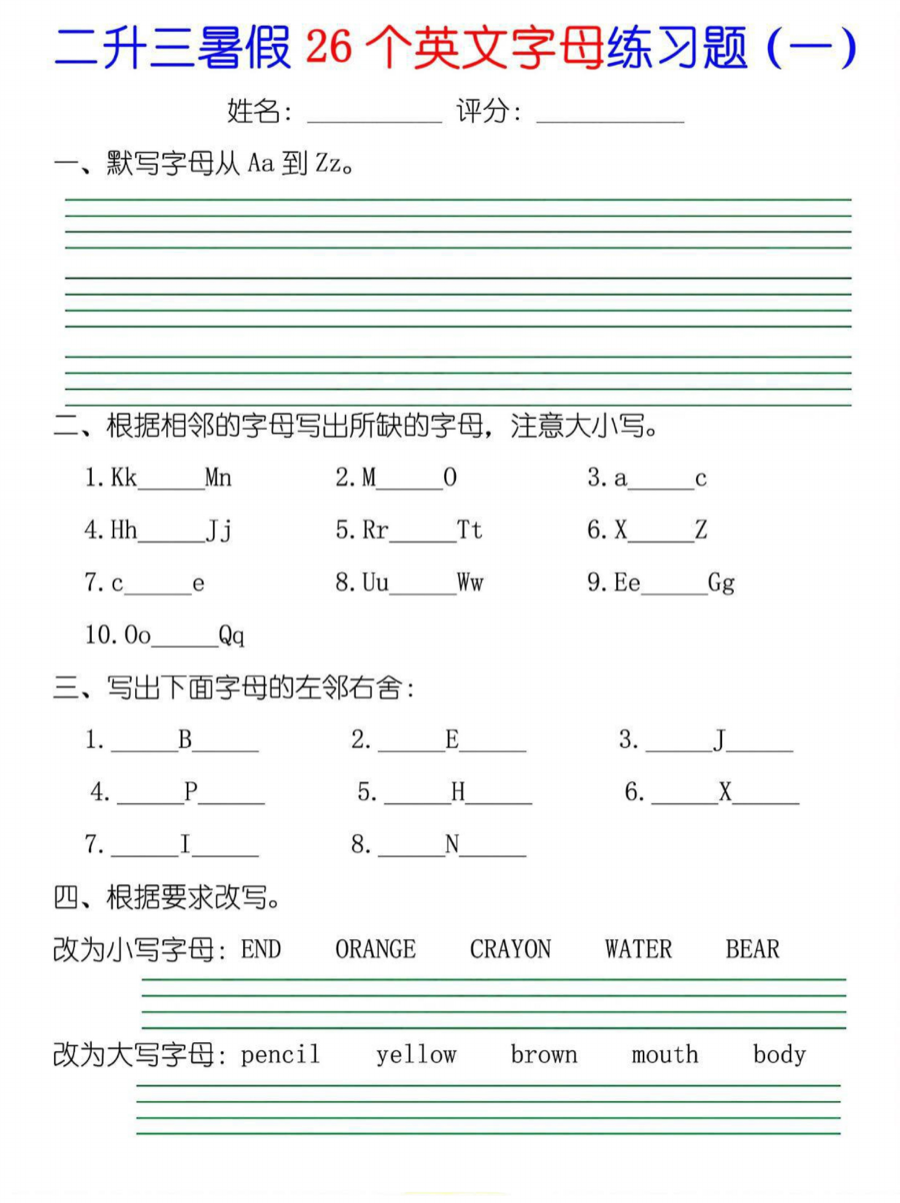
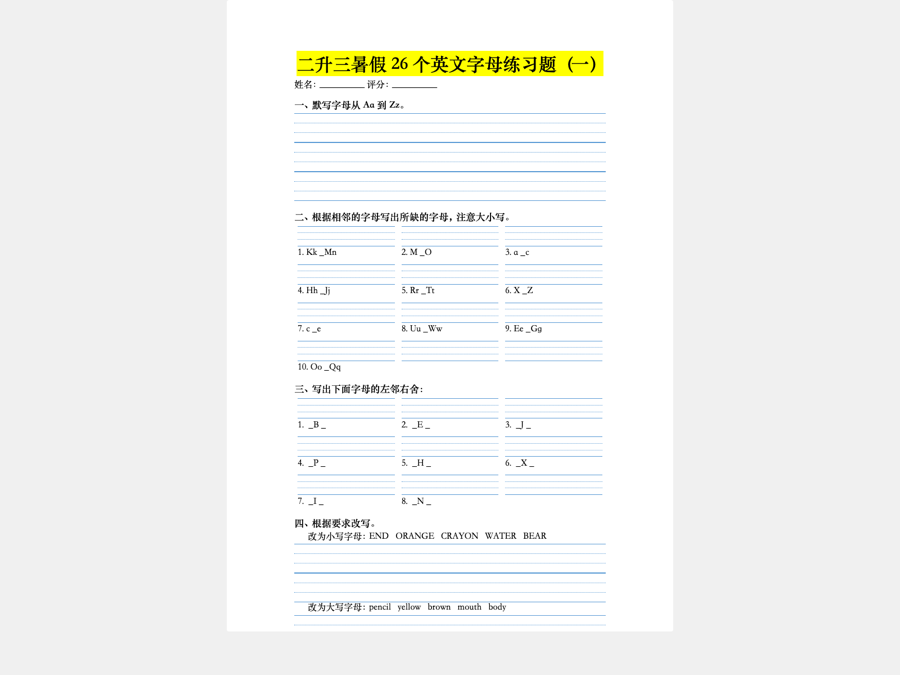
That worksheet is one example; the full path from a scanned page to an editable document — what OCR alone misses, and what "editable" actually means — is covered on our Scanned PDF to Word page.
What you get back
The test of a conversion is not how it looks when it opens, but what happens when you change something. Delete a sentence from a paragraph of Chinese and the paragraph should reflow; retype a figure in a table and the row should hold; insert a line and the page should push down rather than shatter. That only works if the document is made of Word objects:
- Headings and body text as real Word styles, so you can restyle the whole document at once.
- Tables with rows and columns you can retype, resize and re-order — the bordered forms and fee schedules that make up most Chinese business documents.
- Fill-in lines, ruled cells and 四线三格 grids rebuilt as structure, not drawn as an image.
- Columns, margins and spacing that survive editing — official notices and academic papers keep their shape while you work in them.
- Selectable, searchable Chinese text, which is what a translation memory or a CAT tool needs before it can do anything at all. We do not translate the document for you — we hand the Chinese to whatever you translate with.
This is the same engine behind our general PDF to editable Word converter; this page exists because Chinese documents concentrate every hard case at once — mixed scripts, dense grids, scanned pages, fonts nobody has installed. Word is the default output, and the same rebuild can hand you an Excel spreadsheet or Markdown from the same upload if that is what you need.
A note on Chinese fonts in Word
Worth understanding once, because it explains most "it looks fine here, broken for them" reports. A Word file records a font name, not the font itself. Open it somewhere the name cannot be resolved and Word picks a replacement — which for Chinese often means boxes, or a body face that silently turns from serif to sans.
The names matter more than they look. 仿宋 and 楷体 ship with Windows and with Office for Mac; their older registry spellings 仿宋_GB2312 and 楷体_GB2312 ship with neither, and a document naming them can be re-rendered in something else entirely on a Mac. So when the source PDF lets us measure which face it actually used, we write that face's modern canonical name into the .docx — 宋体, 黑体, 仿宋, 楷体, 微软雅黑 — rather than whichever internal spelling the PDF's producer happened to embed, and we never embed a font file. It is not a guarantee about every document that exists; it is one avoidable cause of boxes, removed.
Two things you can do on your side. If a document is going to someone whose machine you do not control, set the Chinese text to a face that ships with Office everywhere — and because the text arrives in real Word styles, that is one change to the style, not a pass through the document. And if you are the one seeing boxes, check before assuming the file is damaged: select the text and look at the font box. If Word shows a face you do not have installed, the characters underneath are intact.
How to convert (3 steps)
- Upload the Chinese PDF — Simplified, Traditional or both, text or scanned, up to 2,000 pages.
- Each page is classified as text or scan, and scanned pages are read by an AI vision model.
- Download the .docx and edit the Chinese directly in Word.
No redirects, no pop-ups, nothing to install, nothing emailed to you. A PDF shaped like a slide deck is routed to PowerPoint automatically instead. Converted files are deleted about six hours later — worth knowing when the document is a contract or a patent.
For the full walkthrough — including the built-in methods Word and Google Docs offer — see how to convert a PDF to an editable Word document.
Free, and what happens when you have a lot of pages
Text-based Chinese PDFs convert free in Basic mode, with no watermark. Basic mode is free and needs no account: 10 pages a day and 100 a month, rising to 100 pages a day and 1,000 a month once you sign in. That covers most of what people paste in: exports from Word or WPS, papers, filings, anything born digital.
Scanned pages are different, because reading them costs real money per page. Turning one into real editable text is AI mode: sign in and add a payment method, or paste your own API key — Anthropic, OpenAI, Gemini or any OpenAI-compatible endpoint — and convert as many scanned pages as you like at your provider's cost. AI mode, which transcribes scanned pages into real editable text, requires a signed-in account with a payment method on file and draws on that same account allowance; beyond it, purchased pages are charged. Converting with your own API key is not metered at all. Without either, Basic mode still finishes the job free: the text pages stay editable and the scanned ones come back as page images. Page packs are listed on the pricing page and are not switched on yet; Basic mode and your own key are what is live today.
Reading in Traditional Chinese? The PDF 轉 Word(繁體) page is written for Taiwan readers specifically.
Sources
Font and language behaviour above is cited from each vendor's own documentation, each page checked 2026-09-16. Each vendor is quoted only about its own software.
FAQ
Chinese PDF to Word — questions
Why does my Chinese PDF turn into boxes or question marks in Word?
Three different faults look identical on screen. The PDF may carry no extractable Unicode, so what gets copied out is meaningless codes rather than characters. The converter may have pasted the page in as a picture or a stack of text boxes, leaving nothing selectable. Or the characters may be perfectly correct while the font named in the file is missing on the machine opening it, so Word substitutes and draws empty boxes. The fix is different in each case, which is why it pays to tell them apart first.
Can you convert a scanned Chinese PDF (a picture PDF) to Word?
Yes — that is the case this tool was built for. A scanned page is read by an AI vision model that recovers the Chinese text and the structure around it, then the page is rebuilt as a Word document: real headings, real paragraphs, real table rows. You get text you can select, search and retype, not an image parked in a frame. That is AI mode: sign in and add a payment method, or bring your own API key. In Basic mode a scanned page comes back as a page image instead.
Can it handle both Simplified and Traditional Chinese?
There is no script setting to choose — you upload the PDF and that is the whole decision. For a text-based PDF the characters come straight out of the file, so whichever script was written stays written. For a scanned page the AI model reads the page as a page. You do not have to work out in advance whether your document is Simplified or Traditional, or split it if it happens to contain both.
Can I convert a PDF to Word with OCR for free?
Text-based Chinese PDFs — anything born digital, such as an export from Word, WPS or a typesetting system — convert in Basic mode. Basic mode is free and needs no account: 10 pages a day and 100 a month, rising to 100 pages a day and 1,000 a month once you sign in. Scanned pages need AI vision, which costs real money per page, so AI mode asks you to sign in and add a payment method; in Basic mode they come back as page images instead. You can also paste your own Anthropic, OpenAI, Gemini or OpenAI-compatible API key and keep going at your provider cost.
How can I convert a Chinese character image to text?
A photograph or scan of Chinese characters has to be read by something that recognises the characters — that is what the AI vision model does here — and the recognised text then has to land somewhere useful. The second half is the part that varies. Text dropped into floating boxes falls apart the moment you edit it; a page rebuilt into real Word paragraphs and tables gives you characters you can select, search, retype and paste anywhere else.
How can I convert a PDF to Word without changing the font?
A .docx carries the name of a typeface, not the typeface itself, and Word resolves that name on whatever machine opens the file. Where the source PDF lets us measure which face it used, we write that face’s modern canonical name (宋体, 黑体, 仿宋, 楷体) rather than the legacy registry spelling, because that is the name Windows and Office for Mac can both resolve. If the face is missing on the reader’s machine Word still substitutes; the fix is one edit to the Word style.
Do I need to install any software or sign up?
No. It runs in the browser: upload, convert, download the .docx. There is no account, no email, no watermark and nothing to install. Converted files are deleted automatically about six hours after conversion, which matters if what you are converting is a contract, a patent or a client document.